🗾 Japan eSIM Guide 2026
Best eSIM for Japan 2026: Truly Unlimited, No Speed Limit — Complete Guide
"Does my phone work in Japan?" Yes — but paying $12/day with AT&T or roaming with any international carrier will cost far more than you expect. Here's the honest guide to staying connected in Tokyo, Kyoto, Osaka and beyond.
BLIVALE Team
Japan eSIM Guide
9 min read
Updated: May 2026
eSIM Japan — Truly Unlimited · No Speed Limit
Everything you need to know before landing at Narita or Haneda
KDDI / SoftBank
Networks in Japan
≥10 Mbps
Minimum guaranteed speed
Hotspot ✓
Tethering included
55 days
To install after purchase
✦ Quick verdict
Install the eSIM before you board. Land in Japan already connected.
Japan is outside the EU roaming zone — no "roam like at home" protection. AT&T charges $12/day, adding up to $84 for a 7-day trip. A local SIM at Narita means a 30–60 minute queue in Japanese. A BLIVALE eSIM Japan installs in 2 minutes from home, connects automatically when you land, and gives you truly unlimited data on KDDI/SoftBank with a guaranteed minimum of 10 Mbps — for the full duration of your plan.
1. Japan's mobile network: KDDI and SoftBank
Japan has one of the world's most advanced mobile infrastructures. Three carriers dominate — NTT Docomo, KDDI (au) and SoftBank. BLIVALE eSIM Japan runs on KDDI and SoftBank, giving you access to two of the three major networks for maximum coverage.
✓ Used by BLIVALE
KDDI (au)
97% population coverage
Strong 4G/5G across all major cities and tourist areas. Excellent even in rural Hokkaido and mountainous regions.
✓ Used by BLIVALE
SoftBank
96% population coverage
Leading 5G rollout in Tokyo, Osaka and Nagoya. Excellent in urban centres and transport hubs.
Minimum guaranteed speed: 10 Mbps. Most eSIM providers promise "maximum available speed" — which means nothing when the network is congested. BLIVALE guarantees a floor of 10 Mbps throughout your plan. In practice, speeds in major Japanese cities regularly exceed 50–150 Mbps on 4G and 200+ Mbps on 5G.
2. Real roaming costs: what international carriers charge in Japan
Japan sits outside every major "free roaming" zone. Here's what travellers from different countries actually pay in 2026.
| Carrier |
Plan |
7-day cost |
Data |
Reality check |
AT&T (USA) International Day Pass |
$12/day |
$84 |
Domestic allowance |
Background apps trigger the $12 charge automatically without you touching your phone. |
T-Mobile (USA) Magenta Max |
Included (throttled) |
$0 + $5/day |
256 kbps or $5 day pass |
256 kbps is barely usable — maps lag, video calls fail consistently. |
Orange (France) World day pass |
€9–€15/day |
€63–105 |
Limited daily bundle |
Data bundle exhausts quickly. Additional usage billed per MB at premium rates. |
Vodafone (UK/EU) International Roaming |
£8–£12/day |
£56–84 |
500 MB–1 GB/day cap |
500 MB is gone in hours of normal use. Throttling or extra charges follow. |
Local SIM — Narita Airport IIJmio, Mobal, NTT Docomo |
~€15–30 total |
~€15–30 |
Capped (5–30 GB) |
30–60 min queue. Often Japanese-speaking staff only. Physical SIM swap required. |
BLIVALE eSIM Japan Unlimited ★ recommended |
Fixed price |
from €17.70 |
Truly unlimited · ≥10 Mbps · no FUP |
Install from home. Active at landing. Hotspot included. 55 days to install after purchase. |
The AT&T trap in Japan: background apps — email, weather, social media — refresh automatically and trigger the $12/day charge without you noticing. A week of "not really using it" can still cost $84. The BLIVALE eSIM Japan is a single fixed price for the entire plan. No surprises.
3. Why a travel eSIM beats every alternative in Japan
No queue at Narita or Haneda
Both major Tokyo airports have SIM card counters — with queues of 30–60 minutes on busy arrival days. You buy the eSIM before leaving home, and when you disable airplane mode after landing, you're already connected on KDDI/SoftBank. No queue, no fumbling with a physical card, no losing your home SIM.
Your home SIM stays active
Modern smartphones are dual SIM — physical SIM + eSIM simultaneously. Your home number stays active for calls and SMS. Use BLIVALE for all data. The critical step: turn off data roaming on your home SIM before landing, otherwise your phone may route data through your home carrier.
Truly unlimited means you never think about data
Japan requires constant connectivity — Google Maps for the complex train network, Google Translate for menus and signs, Suica apps for transport payments, real-time bookings. With a throttled or capped plan, you're rationing every MB. With BLIVALE Japan Unlimited, you use your phone exactly as you would at home.
4. Real usage data from active customers
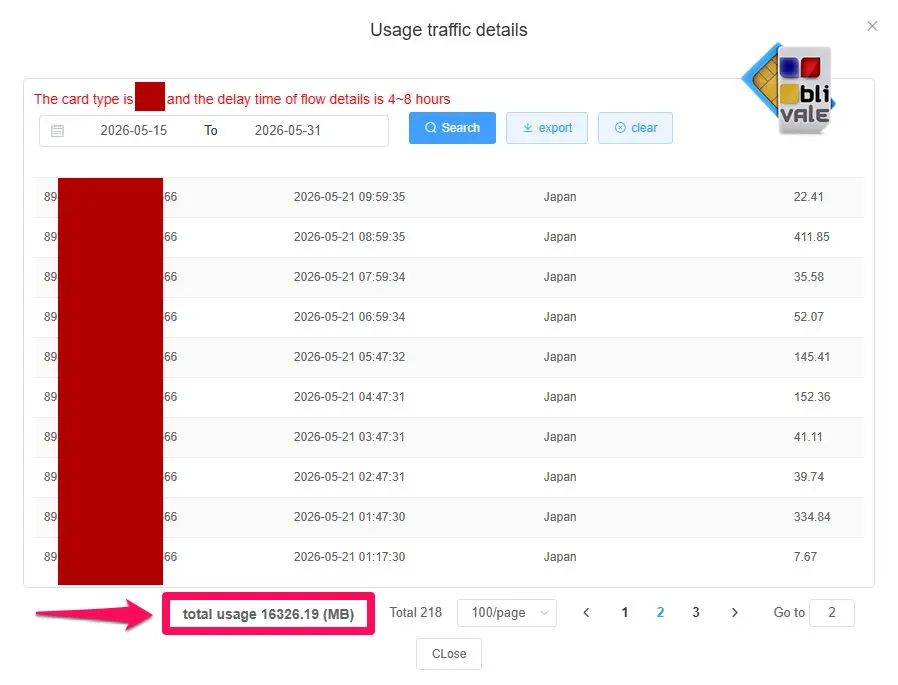
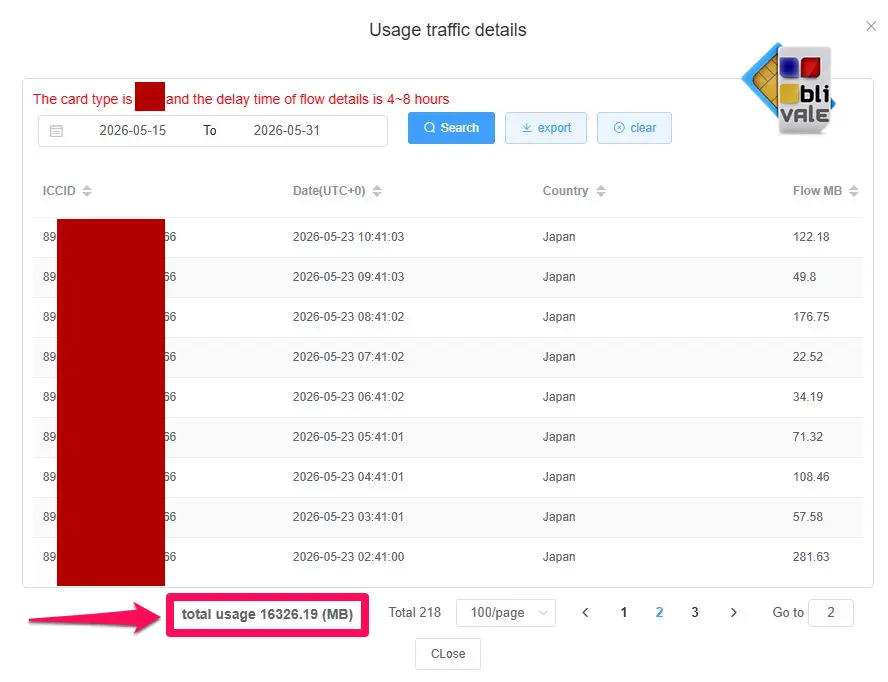
We don't just claim "unlimited" — we show the data. The following are real customer sessions recorded on our platform in May 2026, with sensitive identifiers obscured.
📊 Verified real usage — BLIVALE eSIM Japan, active customers May 2026
ICCID numbers anonymised. Data extracted directly from our traffic management platform.
1
eSIM Japan Unlimited — Customer still active
Card type: eo1 · Sessions ongoing · May 2026
● LIVE
2
eSIM Japan Unlimited — Customer still active
Card type: ep1 · Sessions ongoing · May 2026
● LIVE
5. The 3 Japan plans: 7, 15 and 20 days
All three plans run on KDDI/SoftBank, include hotspot, and start their validity period from the moment you install the eSIM. You have 55 days from purchase to install.
🗾 eSIM Japan Unlimited
KDDI + SoftBank · Min. 10 Mbps · No FUP · Hotspot included
€17.70
✓ Truly unlimited, no FUP
✓ Min. 10 Mbps guaranteed
✓ Hotspot included
✓ 55 days to install
Best for 5–7 day trips
Buy 7 Days →
15 Days ★ Most popular
Japan Unlimited
€37.70
✓ Truly unlimited, no FUP
✓ Min. 10 Mbps guaranteed
✓ Hotspot included
✓ 55 days to install
Best for 10–15 day trips
Buy 15 Days →
€50.70
✓ Truly unlimited, no FUP
✓ Min. 10 Mbps guaranteed
✓ Hotspot included
✓ 55 days to install
Best for long stays & nomads
Buy 20 Days →
View all Japan eSIM plans →
6. How to install before departure — 4 steps
Purchase and receive your QR code
Buy your plan at the links above. Within minutes you receive an email with the QR code and APN configuration instructions. Keep this email accessible on a second device (laptop or tablet) for the next step.
Install the eSIM on your phone
iPhone: Settings → Cellular → Add eSIM → Use QR Code → scan.
Samsung: Settings → Connections → SIM Manager → Add → scan QR.
Android: Settings → Network & Internet → SIMs → Add → scan QR.
Requires active Wi-Fi connection. Takes approximately 2 minutes.
Set BLIVALE as your default data SIM
In your SIM settings, set the BLIVALE eSIM as the preferred data line. Turn off data roaming on your home SIM — this prevents unexpected charges from your home carrier while in Japan.
Land in Japan — already connected
Disable airplane mode after landing at Narita (NRT) or Haneda (HND). The eSIM connects automatically to KDDI or SoftBank. If you experience any issue, the APN configuration guide in your email resolves it in under a minute.
Validity starts on installation, not on landing. Install the eSIM the day before departure — not weeks in advance. You have 55 days from purchase to install, but once installed, your 7/15/20-day clock starts immediately.
7. Coverage by city
KDDI and SoftBank together cover virtually all of Japan's inhabited territory. Here's what to expect in the destinations most visited by international travellers:
🗼
Tokyo
5G throughout the city, including the metro system. Excellent signal even in the deepest subway stations.
5G / 4G LTE — full coverage
⛩️
Kyoto
Strong 4G across the historic centre. Arashiyama, Fushimi Inari and Kinkaku-ji all have reliable coverage.
🏯
Osaka
Dotonbori, Shinsaibashi, Umeda — 5G throughout. Great for real-time navigation across the complex city layout.
5G / 4G LTE — full coverage
🦌
Nara
City centre and Nara Park fully covered. Good 4G throughout the deer park and temple areas.
🌋
Mount Fuji
Good coverage up to and including the 5th Station. Higher elevations may be intermittent — download offline maps before ascending.
❄️
Hokkaido / Sapporo
Sapporo city: excellent. Rural and ski areas: solid 4G in most locations, occasional gaps in very remote mountain terrain.
8. Practical tips for staying connected in Japan
Download these apps before you land
Google Maps offline — download Tokyo, Kyoto and Osaka map areas on Wi-Fi at home. Google Translate with Japanese offline pack — essential for menus, signs and station displays. Suica or IC Card app — works with Apple Pay and Google Pay for trains, buses and convenience stores.
Hotspot: working remotely from Japan
Hotspot is fully included in all BLIVALE Japan Unlimited plans. Connect your laptop or tablet directly to your phone and work with the same unlimited, minimum 10 Mbps connection. No additional charge, no separate data cap for tethering.
Public Wi-Fi in Japan
7-Eleven, FamilyMart and Lawson offer free Wi-Fi, as do most JR stations. Connection quality varies. With BLIVALE Japan Unlimited, you never need to hunt for a hotspot — but it's a useful backup if you want to conserve battery.
Before boarding: validity starts from installation, not from landing. Install the eSIM the day before departure. Once installed, your plan clock starts — so don't install weeks in advance.
9. FAQ
1
Which network does BLIVALE use in Japan?
+
BLIVALE eSIM Japan runs on KDDI and SoftBank — two of Japan's three major carriers. Combined, they cover 96–97% of Japan's population including all major cities, tourist destinations, transportation hubs and most rural areas.
2
Is there really no speed limit or FUP?
+
Correct — no FUP, no daily data cap, no throttling for normal personal use. BLIVALE guarantees a minimum speed of 10 Mbps throughout your plan. In major Japanese cities, speeds typically range between 50–150 Mbps on 4G and higher on 5G.
3
Does it work immediately at Narita or Haneda airport?
+
Yes. Disable airplane mode after landing and the eSIM connects automatically to KDDI or SoftBank. Coverage is active throughout both Narita (NRT) and Haneda (HND) airports. If you experience a connection issue, the APN configuration instructions in your purchase email resolve it in under a minute.
4
When does the validity period start?
+
Validity starts from the moment you install the eSIM, not from first use in Japan. Install it the day before departure for maximum efficiency. You have 55 days from purchase to install — so buying in advance is fine as long as you install within that window.
Yes. Hotspot and tethering are fully supported on all BLIVALE Japan Unlimited plans. Connect your laptop, tablet or other devices. Hotspot usage counts as normal personal use — no extra charge, no additional cap.
6
Can I keep my home SIM active at the same time?
+
Yes. Your phone uses both the physical SIM (home number, calls and SMS) and the BLIVALE eSIM (data) simultaneously. The critical step: disable data roaming on your home SIM before landing. Otherwise your phone may route data through your home carrier, triggering the roaming charges you're trying to avoid.
Land in Japan already connected.
KDDI + SoftBank · Min. 10 Mbps · Hotspot included · No FUP · 55 days to install
Get your Japan eSIM →
B
BLIVALE Team
International eSIM & connectivity · blivale.com